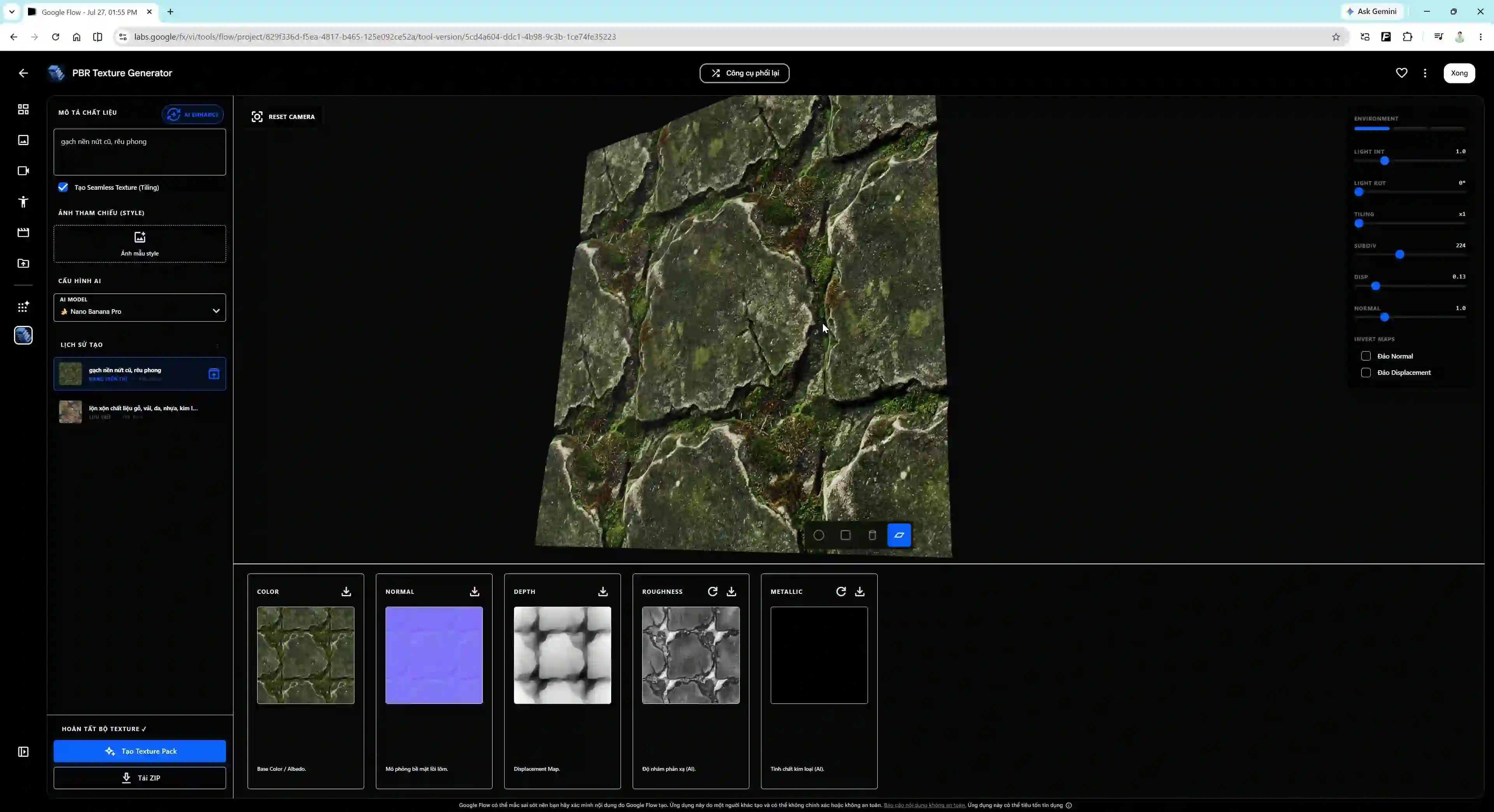
Hướng dẫn tạo PBR Texture trên Google Flow
Trong quy trình làm 3D và CGI, việc tự tạo hoặc chuẩn bị bộ chất liệu PBR Texture (Physically Based Rendering) thường tốn nhiều thời gian. Thông thường, người làm 3D cần ảnh chụp thực tế rồi đưa vào các phần mềm như Substance Sampler hoặc Photoshop để trích xuất các bản đồ map (Albedo, Normal, Roughness, Depth, Metallic).
Bài viết này chia sẻ một workflow chạy trực tiếp trên Google Flow Tools, cho phép tự tạo bộ 5 map PBR Texture từ mô tả văn bản (Prompt) bằng tài khoản Google.
Dưới đây là video minh họa thao tác thực hiện:
Cơ chế hoạt động
Workflow này sử dụng 2 mô hình AI phối hợp với nhau:
- Nano Banana Model: Tạo hình ảnh bề mặt chất liệu gốc (Base Color / Albedo) dựa trên câu prompt mô tả.
- Depth Anything Model: Tự động phân tích ảnh bề mặt để tính toán bản đồ độ sâu (Depth Map), sau đó suy ra các map phụ trợ gồm: Displacement Map, Normal Map, Roughness Map, và Metallic Map.
Quá trình tính toán và trích xuất map được thực hiện trực tiếp trên trình duyệt web thông qua Google Flow.
Các bước thực hiện
Bước 1: Khởi tạo Tool trong dự án Google Flow
- Bấm nút Mở Google Flow PBR Texture Tool phía trên để đến liên kết chia sẻ.
- Chọn Dùng thử trong một dự án (Try in a project) và chọn dự án Google Flow muốn tích hợp tool.
- Đợi vài giây để hệ thống nạp các node chức năng vào giao diện.
Bước 2: Nhập prompt & dùng tính năng AI Enhance
- Nhập mô tả chất liệu cần tạo vào ô Prompt (Ví dụ: “Old weathered wooden plank texture with cracks”, “Modern polished marble with gold veins”).
- Nhấn nút AI Enhance bên cạnh nếu muốn Google Flow tự động mở rộng prompt thành mô tả chi tiết hơn.
Bước 3: Tạo bộ Texture Pack
- Nhấn nút Tạo texture pack (Generate texture pack).
- ⏱️ Thời gian xử lý:
- Lần đầu tiên: Mất khoảng 4 - 5 phút do trình duyệt phải tải mô hình Depth Anything (dung lượng khoảng 50 - 60MB) vào bộ nhớ đệm cache.
- Các lần tiếp theo: Model đã lưu trên cache nên thời gian tạo bộ map mới giảm xuống còn khoảng 1 - 2 phút.
Bước 4: Tải về file ZIP
- Khi quá trình hoàn tất, giao diện hiển thị bản xem trước của 5 map texture.
- Bấm nút Tải Zip (Download Zip) để tải file nén chứa đầy đủ các file map về máy.
- Giải nén và gán các file map này vào phần mềm 3D như Blender, Cinema 4D hay Unreal Engine.
Tổng kết
Quy trình sử dụng Google Flow kết hợp Nano Banana và Depth Anything giúp tự động hóa bước tạo các bản đồ chất liệu PBR trực tiếp trên trình duyệt web. Kết quả thu được phù hợp để làm tài nguyên phác thảo (prototype) hoặc chất liệu nền cho các phần mềm 3D như Blender, Cinema 4D hay Unreal Engine. Với các dự án yêu cầu độ phân giải cao hoặc chi tiết bề mặt phức tạp, bạn nên kiểm tra và tinh chỉnh lại các map bằng phần mềm chuyên dụng.
Nếu có thắc mắc hoặc góp ý trong quá trình thao tác, bạn có thể để lại bình luận ở phía dưới.
Google Flow PBR Texture Generator Guide
In 3D and CGI workflows, preparing PBR (Physically Based Rendering) texture sets often requires considerable time. Typically, 3D artists extract texture maps (Albedo, Normal, Roughness, Depth, Metallic) from real-world photographs using software like Substance Sampler or Photoshop.
This article shares a workflow running directly on Google Flow Tools that generates a 5-map PBR Texture set from a text prompt using a Google account.
Below is a video demonstrating the step-by-step process:
How It Works
This workflow combines two AI models:
- Nano Banana Model: Generates the base surface texture image (Base Color / Albedo) from your text prompt.
- Depth Anything Model: Analyzes the surface image to calculate a Depth Map, then derives auxiliary maps including: Displacement Map, Normal Map, Roughness Map, and Metallic Map.
All computations and map extractions run directly in your web browser via Google Flow.
Step-by-Step Guide
Step 1: Initialize the Tool in Google Flow
- Click Open Google Flow PBR Texture Tool above to navigate to the shared link.
- Select Try in a project and choose the Google Flow project where you want to add the tool.
- Wait a few seconds for the function nodes to load into the workspace.
Step 2: Input Prompt & Use AI Enhance
- Enter your material description into the Prompt field (e.g., “Old weathered wooden plank texture with cracks”, “Modern polished marble with gold veins”).
- Click AI Enhance if you want Google Flow to automatically expand your prompt with more descriptive detail.
Step 3: Generate Texture Pack
- Click Generate texture pack.
- ⏱️ Processing Time:
- First Run: Takes about 4–5 minutes because the browser needs to download the Depth Anything model (~50–60MB) into your browser cache.
- Subsequent Runs: Since the model is cached, generating new texture sets takes only 1–2 minutes.
Step 4: Download ZIP File
- Once generation finishes, a preview of all 5 texture maps will be displayed.
- Click Download Zip to download the archive containing all map files.
- Extract the files and assign them to your 3D materials in Blender, Cinema 4D, or Unreal Engine.
Summary
Combining Google Flow with Nano Banana and Depth Anything automates PBR material map generation inside the web browser. The output maps serve well as prototyping assets or base textures for 3D software such as Blender, Cinema 4D, or Unreal Engine. For production projects demanding high resolution or complex micro-surface details, inspecting and refining maps in dedicated software is recommended.
If you have questions or feedback regarding this workflow, feel free to leave a comment below.